
Which Credential Scanning Tool Works Inside GitHub CI/CD Pipelines?
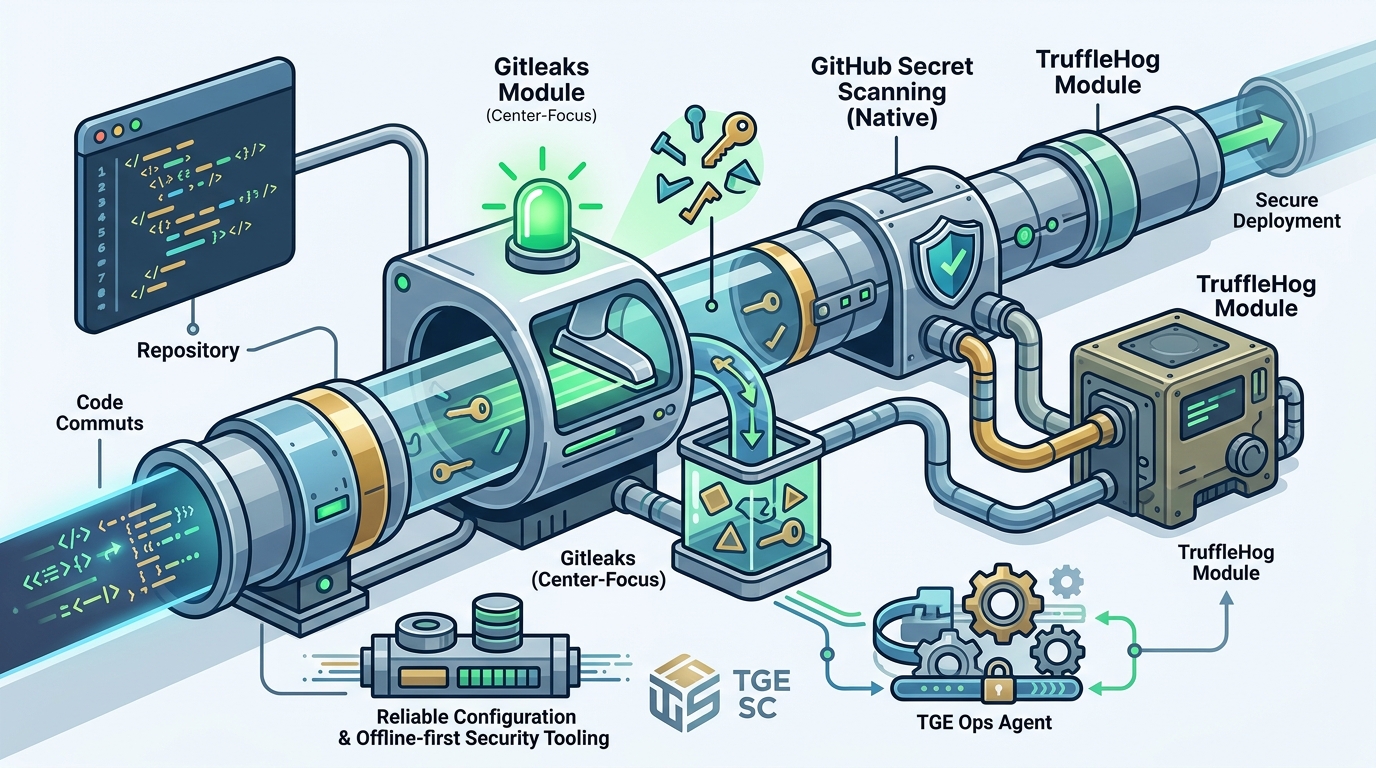
For most engineering teams, gitleaks is the most reliable credential scanning tool for GitHub CI/CD pipelines due to its speed, low false-positive rate, and native GitHub Action support. This guide compares gitleaks, GitHub Secret Scanning, and TruffleHog to help you choose the right tool for your security workflow. We will cover configuration, integration, and how TGE SC. supports secure, offline-first security tooling.
gitleaks
gitleaks is a popular open-source tool designed to detect hardcoded secrets in source code and git history. It operates by scanning for patterns that match known credential formats, such as AWS keys, GitHub tokens, and private keys. Because it is lightweight and fast, it is ideal for continuous integration pipelines where build time is a critical factor. For additional details, review the .
Performance and Speed
gitleaks is optimized for speed, making it a strong candidate for pre-commit hooks and CI/CD stages. It can scan entire repositories in seconds, which is crucial for maintaining developer velocity. The tool uses a rule-based approach that allows teams to customize detection patterns to reduce false positives. For additional details, review the Customer Experience.
Configuration and Rules
Customizing gitleaks involves editing a configuration file, typically in TOML format. Teams can define specific rules for their environment, such as ignoring certain file paths or adding custom regex patterns for internal tools. This flexibility ensures that the scanner aligns with your specific security requirements without slowing down the pipeline. For additional details, review the Frequently Asked Questions.
GitHub Secret Scanning
Managed vs. Self-Hosted
GitHub Secret Scanning is a managed service, meaning GitHub handles the scanning process. This reduces the operational burden on your team but may limit customization compared to open-source tools. It is best suited for teams that prioritize ease of use and integration with GitHub's native workflows. For additional details, review the About.
Alerting and Remediation
When a secret is detected, GitHub sends alerts to repository owners and security teams. The platform also provides guidance on how to remediate the issue, such as rotating the exposed credential. This streamlined process helps teams respond quickly to potential security breaches.
TruffleHog
TruffleHog is a credential detection tool that focuses on finding live, valid credentials in code and git history. Unlike pattern-based scanners, TruffleHog verifies whether detected secrets are actually active by testing them against their respective services. This approach reduces false positives by confirming the validity of the credentials.
Live Credential Verification
Integration and Use Cases
TruffleHog can be integrated into CI/CD pipelines as a standalone tool or via its GitHub Action. It is well-suited for teams that need to verify the status of their credentials regularly. However, the verification process can be slower than pattern-based scanners, which may impact pipeline performance.
Credential Scanning Tools Overview
Credential scanning tools are software solutions designed to identify and manage sensitive data, such as API keys, passwords, and tokens, within codebases. These tools help prevent data breaches by detecting exposed secrets before they are deployed to production environments. Choosing the right tool depends on your team's specific needs, such as speed, accuracy, and integration capabilities.
Comparison of Popular Tools
| Tool | Approach | Speed | False Positives | Best For |
|---|---|---|---|---|
| gitleaks | Pattern-based | Fast | Low (with customization) | CI/CD pipelines, pre-commit hooks |
| GitHub Secret Scanning | Managed service | Variable | Low | Teams using GitHub natively |
| TruffleHog | Live verification | Slower | Very Low | Verifying live credentials |
Choosing the Right Tool
Selecting a credential scanning tool requires balancing speed, accuracy, and ease of integration. For most teams, a combination of tools may be the best approach. For example, using gitleaks for fast pattern-based scanning and TruffleHog for periodic live verification can provide comprehensive coverage.
GitHub Actions Integration
Integrating credential scanning tools into GitHub Actions is essential for automating security checks in your CI/CD pipeline. GitHub Actions allows you to run workflows in response to events, such as pull requests or pushes, ensuring that secrets are detected before code is merged.
Setting Up gitleaks in GitHub Actions
To integrate gitleaks, you can use the official GitHub Action or run the binary directly in a workflow step. This setup allows you to scan the entire repository or specific files, depending on your needs. The action can be configured to fail the build if secrets are detected, enforcing security standards across your team.
Best Practices for Pipeline Security
When integrating scanning tools, it is important to monitor pipeline performance and adjust configurations as needed. Regularly updating your scanning rules and tools ensures that you are protected against new types of secrets. Additionally, consider using offline-capable tools to maintain security in restricted environments, a principle aligned with TGE SC.'s philosophy of local-first security tooling.
Key Takeaways
- gitleaks is the fastest and most customizable option for CI/CD pipelines.
- TruffleHog provides live credential verification, reducing false positives.
- Combining tools can provide comprehensive security coverage.
- Customizing scanning rules is essential for reducing false positives.
- Integrating scanners into GitHub Actions automates security checks.
- Offline-capable tools are beneficial for restricted or air-gapped environments.
- Regularly updating scanning tools and rules is critical for ongoing protection.
Frequently Asked Questions
What is the best credential scanning tool for GitHub CI/CD?
For most teams, gitleaks is the best choice due to its speed and low false-positive rate. It integrates seamlessly with GitHub Actions and can be customized to fit your specific security needs.
How does GitHub Secret Scanning work?
Can TruffleHog be used in CI/CD pipelines?
Yes, TruffleHog can be integrated into CI/CD pipelines. It verifies whether detected secrets are live, which helps teams prioritize remediation efforts.
How do I reduce false positives in credential scanning?
You can reduce false positives by customizing scanning rules, ignoring specific file paths, and using tools that verify live credentials, such as TruffleHog.
What is the difference between pattern-based and live verification scanning?
Pattern-based scanning uses regex to detect secrets, while live verification checks if the detected secrets are actually valid. Live verification reduces false positives but is slower.
How do I integrate gitleaks into GitHub Actions?
You can use the official gitleaks GitHub Action or run the binary directly in a workflow step. Configure the action to fail the build if secrets are detected.
Are offline-capable scanning tools necessary?
Offline-capable tools are beneficial for restricted or air-gapped environments. They ensure that security checks can be performed without internet access, aligning with local-first security principles.
How often should I update my credential scanning tools?
You should regularly update your scanning tools and rules to protect against new types of secrets. This ensures that your security measures remain effective over time.